Showing posts with label Microsoft365. Show all posts

Monday, December 12, 2022

The new multiple administrative approvals experience

Imagine a compromised administrative account going wild in your Intune environment. Wouldn't it be great to protect your configuration with a second factor, like MFA? Join me while I experience the new Multiple Administrative Approvals (MAA) feature for Intune which is out in public preview! 


By using Intune access polices we can require a second administrative account to approve changes in the environment before they are applied to the production environment. This can give associations to MFA (Multi Factor Authentication), but let's welcome MAA (Multiple Administrative Approvals) instead.

Tuesday, December 6, 2022

HP Connect for Intune, Part2: BIOS Authentication

This is part 2 in my series of blog posts covering HP Connect for Intune. The first post covered how to get the BIOS patched to the latest release. Today I cover the BIOS authentication, which is an important aspect of managing, controlling and securing Windows devices. If the BIOS can be accessed without authentication, a local or remote user may be able to disable basic security features, perhaps introducing malware early into the startup process that Windows may not protect against.  


The ultimate goal is to have a security boundary covering all aspects from chip to cloud. An UEFI BIOS is the chip containing the hardware start-up code and many settings that should be secured prior to booting into a Windows Operation System. We will manage the BIOS security limiting setting changes only to users or administrators with knowledge of the authentication mechanism. 

Please note: This is not a sponsored post!

Thursday, November 24, 2022

Let Intune stimulate mobile updates

Mobile devices can be a challenging asset to manage and keep secure with their many variations in ownership, management and operating systems. This blog post will give you some ideas on how you can enforce a minimum version of the operating system on the mobile phones accessing the company's data in Microsoft 365.

The cell phone is for many users the edge of privacy where they can accept the company's administration. At the same time, it is important for the company to have control over its data and applications. 


An important prerequisite must be set from the orgranization - Yes, users can have access to data, under defined conditions. One important security measure is to ensure updated software regardless of management mode. Let us dive into the condition of having updated operative systems on the mobile device accessing company data.

Thursday, September 29, 2022

Branding your tenant and managed endpoints

A clear brand builds identity and affiliation. Microsoft 365 and Endpoint Manager has a rich set of tools for customizing your brand into the products. This will look nice and integrated, and it will help the end users detect security attacks. Let's take a deep dive into the possibilities associated with branding your tenant and endpoints!


A brand is a name, term, design, symbol or any other feature that distinguishes one company's good or service from those of other companies. Brands are used for recognition, creating values and identification. A brand is the sum of all expressions by which an entity (person, organization, company, business unit, city, nation, etc.) intends to be recognized.

With a workforce spread all over the modern hybrid workplace, it is more important than ever to spread the love of the company's brand. This blogpost will focus on how your brand can be incorporated to Microsoft 365 and all endpoints by Microsoft Endpoint Manager.

Friday, September 16, 2022

Building a MEMpowered LAB environment


In my early days as consultant within Microsoft technologies, I had complete lab environments running as virtual machines on heavy workstation laptops. Through the years as I have migrated to a cloud first philosophy, my lab environments have followed along. Working mainly with Microsoft 365 and Microsoft Endpoint Manager, my lab environments are now cloud based. 

I still remember making a decision moving from high performance laptops hosting all my virtualized lab environments. Looking back to my first switch to a lightweight Surface, I don't regret. The new light weighted devices powered by the cloud has been fantastic in my everyday work life. But - I still need environments to test and verify technologies and ideas before putting them to production. This blog post will cover some ways to build lab environments for the cloud based Microsoft solutions.


Monday, August 15, 2022

Automating Teams voice reporting of users (2:2)

This is a follow up on my last blog post covering automated teams voice assignment for users. This time I will cover how the mentioned routine has been expanded to do reporting in PowerBI to show evolution and distribution throughout the lifetime of the service.

After running my routine of automated voice assignment in Teams for a while, I felt the need to have an overview of the solution and how it evolved.


Monday, August 8, 2022

Automating Teams voice assignment for users (1:2)

In order to manage voice and phone number assignments in Microsoft Teams, you need at least Teams Communications Administrator role. This role does however have more privileges than most organizations want to assign to their first line staff. This blog post will cover a way for first line to automate voice activation of users with the granularity necessary to cover several technologies such as Direct Routing and Operator Connect.

The main idea is to let first line operators use the tools they have access to when managing users without the demand of acquiring extra privileges.


By adding the Teams phone number in E.164 format to the users telephoneNumber field in AD/AAD and assigning the user as member of a defined security group, I have enough information to automate the Teams voice assignment for the user. This could also include license assignment through the group membership.

Monday, August 1, 2022

Find where your colleagues are on a floor plan

Microsoft Search helps users find relevant content, the right answers or people. Search administrators use their knowledge of the organization and its users to make it easy for users to find the relevant content. This blog post will cover how you can prepare information about employees in order to place them on a floor plan for the office buildings. 

This type of setup is part of my mindset of using as many features as possible from the Microsoft 365 licenses, often triggered through configuration and maintenance of information which provides value throughout the product line.


This kind of functionality will add value when searching for colleagues in the office landscape, or even when searching for the closest meeting room.

Monday, July 25, 2022

Autopilot - Device deadlock between two tenants

After wiping a Windows10 Autopilot device from Microsoft Endpoint Manager, we got welcomed to the correct tenant by name and logo. When signing in with a current licensed user, we got the message saying "That username looks like it belongs to another organization. try signing in again or start over with a different account". Time to troubleshoot!

The background for the wipe was to repurpose the device for a new user. 


Windows Autopilot is managed and maintained by Microsoft in a backend database that associates hashes with customer tenants. This time I got a schizophrenic device dealing with two tenants.

Monday, July 18, 2022

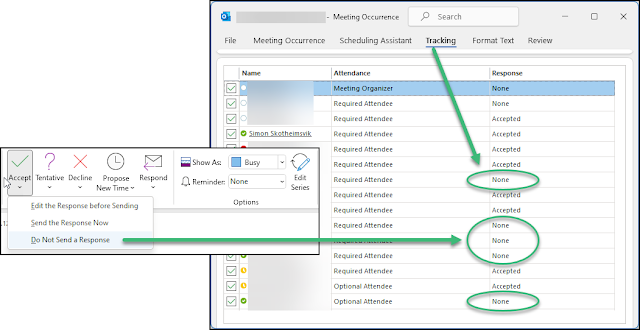
Disable "Do Not Send a Response" option in Outlook with MDM

When users select the option to not send a response when accepting a meeting invite in Microsoft Outlook, their response is not visible for the invitee. This makes it troublesome to keep track of attendees for the meeting. This is why many organizations want to disable this option. 

If someone replies to a meeting invite by using the "Do Not Send a Response" option, the action is marked in the users calendar, but it will not reflect in the meeting tracking visible for invitees.


The problem has been present for a long time, and there has been some information available on how this can be solved by use of Group Policies in legacy Active Directory environments. Here's how to remove the option to not send a response on meeting invites using Configuration Policies in Microsoft Endpoint Manager and a Settings Catalog profile type.

Monday, July 11, 2022

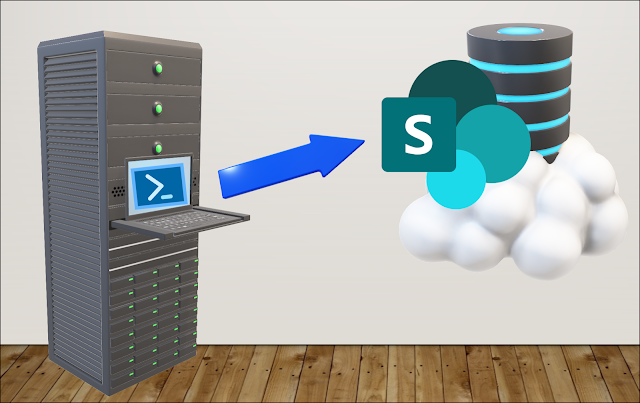
Automatic file upload from legacy server to Microsoft 365

Companies that have gone through several generations of IT systems will have to make their cloud journey in small steps - system by system. Devices and document storage are quickly moved to Microsoft 365. Special Line of Business systems may take longer to cloudify. This can present challenges in making data from dinosaur systems available to users of the modern Microsoft 365 platform.

The challenge from a real world scenario

I was challenged by a customer with a production environment running in an old on premises environment while all users and endpoints had converted to Microsoft 365. They had challenges in reaching reports that were produced on premises and needed a solution to have this data automatically uploaded to Sharepoint for easy and modern access. Challenge accepted!

Tuesday, July 5, 2022

Fortinet VPN Profile distribution with MDM

Fortinet Document Library has a documented routine for distributing the FortiClient application with Intune to Microsoft Windows. This routine is working Ok, but it is missing information on how to distribute the VPN profiles to the client. This will be the topic for this post.

Installation of the FortiClient application

Please read and follow the document in Fortinet Document Library covering the topic of configuring the FortiClient application in Intune. During this routing you need to download the current FortiClient VPN client and start the downloaded EXE file to download the actual MSI installation. This could be wise to do in a Windows Sandbox environment. You will find the MSI file in the newest folder with {randomguid} name under %localappdata%\Temp\.

After this routine has been setup and you have the app distributed to a group and installed, you will find the application available in the system tray on the devices.
FortiClient without VPN profile

The problem here, is the missing VPN profile for connecting your client to the service.

Thursday, June 2, 2022

Reduce background noice in Teams Room System

It has been a while since Microsoft released their machine learning based noise suppression for Microsoft Teams. With this setting available all background noise like shuffling papers, slamming doors, barking dogs, and so on are effectively reduced. This technology has quickly fallen into our pattern of use - which in turn has led to expectations of finding this in the meeting rooms

The new hybrid workspace is the hottest trend right now. At any time, a hybrid workplace will consist of both remote workers and in-office workers. Synchronizing these groups of employees into a cohesive, collaborative unit can be quite a challenge in order to not leave one group feeling anonymized or voiceless. 

Microsoft Teams rooms should bring organizations closer to the ideal of hybrid work giving remote side workers the same opportunities to actively participate in the meeting. We see constant developments to support this, like the recent Front Row Layout for meetings. 

As a remote worker, I often find unintentional noise from meeting rooms to be the biggest disturbance in meetings. This can be all from paperwork, pens and fingers drumming on the table, cups and cutlery, small talk and meeting in meetings. I am therefore happy to finally see machine-based noise cancellation available on the Teams Rooms System.

When in a call, settings for noise suppression are now found on the meeting room controller:

Click on the image for a larger view

Teams offers three levels of noise suppression to help keep meeting participants focused. These settings can be changed at any time. For the Teams desktop app and iOS, the settings carries over to the next meeting or call once they are changed. This is not yet the case for Teams Room System. 

The noise suppression feature can be enabled or disabled on the Teams Room Device by use of the NoiseSuppressionDefault variable found in an XML Configuration file as described here

Click on the image for a larger view

The article describes several settings and how these can be implemented on devices in small and large scale. The documentation does not state how to set Low or High as the default setting. This has been discussed in this Twitter thread, where @MauroB94454117 states that the code implemented is ahead of documentation at this time. The documentation is missing the part on how to force noise suppression to Low or High settings. This is done with the following variables in the XML file which are tested and found Ok:

0 = Off
1 = Auto
2 = Low
3= High 

The following XML file gave me the highest level of noise suppression as the default state:

<SkypeSettings>
  <NoiseSuppressionDefault>3</NoiseSuppressionDefault>
</SkypeSettings>

 These are small steps to a better hybrid workspace in the modern workplace!

Hardware based noise suppression

Logitech Rally cameras are also introducing AI noise suppression enhancement algorithms in their firmware version 1.1.167. This is to improve video conferencing experience for remote participants. This update is available for download from the Logi webpages.

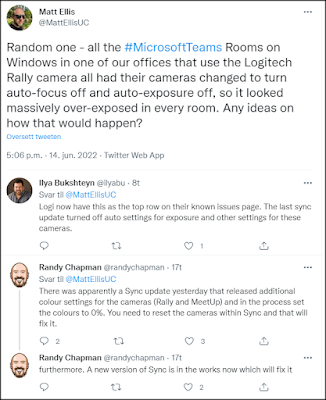
Normally updates of firmware and software brings new features and better security, but it also seems to introduce new unintentional problems - or "features". There are information in the community stating that the Logitech Rally Cameras might get problem with exposure and focus after updating. You can read about this on a fresh twitter message dialogue from Matt Ellis, Ilya Bukshteyn and Randy Chapman:

15.08.2022 - Video demo
Today a great video demo on this feature was released by ISDM Solutions - take a look here: https://youtu.be/gVvspCd0FaA 


Tuesday, April 19, 2022

Veeam Backup for M365 Automatic Reporting in PowerBI

Those of you which has read through the Microsoft services agreement might have noticed paragraph 6b where Microsoft recommends that you regularly backup your content and data that you store on the services using third-party apps and services. One example of such third party tool popular by managed service providers is the Veeam Backup for Microsoft 365. This blog post will explain how you can get automatic reporting on licenses and sizes used by this application.

Please note: This is not a sponsored post!

Data Deletion

Data deletion can occur when an attacker deletes your data, usually in a way that makes recovery difficult, if not impossible. A variant of this type of attack includes ransomware. With ransomware, an attacker compromises the network, encrypts data, and then demands a payment to get the key to decrypt the data. This may equate to data deletion since a successful extraction of payment often leads to more targeting by the attacker. Attacker motivations for data deletion covering the tracks of an attack, attempting to do irreparable harm to your business, or simply trying to spite you or your employees

Preventing data deletion

Other than the protection mechanisms you should employ to prevent account breach an elevation of privileges, your core prevention strategy should be to ensure you have sufficient redundancies built into your data management processes to minimize the impact of data deletion. Data in Microsoft 365 is made redundant for maximum availability by the service. However, it's still possible for an attacker to delete data from SharePoint sites and recycle bins, making it almost impossible to recover. There is also examples of bugs where data has been deleted from Teams and Sharepoint. Therefore, it's critical that you have a process for backing up mission critical data to offline stores - just like the Microsoft Services Agreement states.

Veeam Backup for Microsoft Office 365

Veeam Backup for Microsoft 365 is one application which can help eliminate the risk of losing access and control over your Office 365 data, including Exchange Online, SharePoint Online, OneDrive for Business and Microsoft Teams. This product is often used by managed service providers offering their services to customers. One challenge will be to automate a reporting solution showing the usage of the service related to license and storage on repositories.

Report automation

Niels Engelen has described a way to automatically send reports from Veeam by email. This is a simple approach to the standard functionality where PDF report will be sent by e-mail. It just didn't fit my expectations for reporting. 

PowerShell data harvesting

I have studied the Veeam Backup for Microsoft 365 PowerShell Reference and made a script counting all licenses, data usage and repository usage on a daily basis. This data is prepared in a JSON format and uploaded to an Azure Cosmos Database. The Azure Cosmos Database is quite inexpensive for this kind of usage. 

The following query will list all licensed users in a JSON format before uploading each record to the Cosmos database.
# Get VBO Licensed users, convert to JSON and upload to CosmosDB
$CosmosDBCollectionID = 'VeeamBackupLicenses'
$LicensedUser = Get-VBOLicensedUser

$output = foreach ($user in $LicensedUser) {
    $LastBackupDate = (($user.LastBackupDate).toString()).Split(" ")[0]
    $id = $([Guid]::NewGuid().ToString())
    $doc = [pscustomobject]@{
        id               = $id
        Username         = $user.UserName
        LastBackupDate   = $LastBackupDate
        Year             = (($LastBackupDate).toString()).Split(".")[2]
        Month            = (($LastBackupDate).toString()).Split(".")[1]
        LicenseState     = $user.LicenseState
        OrganizationName = $user.OrganizationName
    }
    $document = $doc | ConvertTo-json | Out-String
    # Writing data to CosmosDB
    New-CosmosDbDocument -Context $cosmosDbContext -CollectionId $CosmosDBCollectionID -DocumentBody $document -PartitionKey $id -Encoding UTF-8
}


The next query will get the usage pr. organization and upload this to a CosmosDB in JSON format:
# Get VBO Usage pr Organization, convert to JSON and upload to CosmosDB
$CosmosDBCollectionID = 'VeeamBackupUsage'
$Organizations = Get-VBOOrganization
$Date = get-date -Format "dd.MM.yyyy"

$UsageOutput = foreach ($Org in $Organizations) {
    $UsageData = Get-VBOUsageData -Organization $Org
    # Need to handle the fact that a customer can have data in several repositories
    foreach ($Usage in $UsageData) {
        $id = $([Guid]::NewGuid().ToString())
        $UsedSpaceGb = [MATH]::Round((($Usage.UsedSpace) / 1024 / 1024 / 1024), 1)
        $Udoc = [pscustomobject]@{
            id               = $id
            Date             = $Date
            RepositoryId     = $Usage.RepositoryId
            UsedSpaceB       = $Usage.UsedSpace
            UsedSpaceGB      = $UsedSpaceGb
            OrganizationName = $Usage.Organization.DisplayName
            OrganizationMSID = ($Usage.Organization.Id.Value).Split(":")[0]
        }
        $Udocument = $Udoc | ConvertTo-json | Out-String
        # Writing data to CosmosDB
        New-CosmosDbDocument -Context $cosmosDbContext -CollectionId $CosmosDBCollectionID -DocumentBody $Udocument -PartitionKey $id -Encoding UTF-8
    }
}

The third query will get information about the repositories defined in Veeam Backup for Microsoft 365 and upload this in JSON format to the Cosmos Database. The original data values from the queries are in bytes format.
# Get VBO Repositories, convert to JSON and upload to CosmosDB
$CosmosDBCollectionID = 'VeeamBackupRepositories'
$Repositories = Get-VBORepository
$Date = get-date -Format "dd.MM.yyyy"

$RepositoryOutput = foreach ($Repo in $Repositories) {
    $id = $([Guid]::NewGuid().ToString())
    $RepoCapacityTb = [MATH]::Round((($Repo.Capacity) / 1024 / 1024 / 1024 / 1024), 1)
    $RepoFreeSpaceTb = [MATH]::Round((($Repo.FreeSpace) / 1024 / 1024 / 1024 / 1024), 1)
    $Rdoc = [pscustomobject]@{
        id                    = $id
        Date                  = $Date
        RepositoryId          = $Repo.Id.Guid
        RepoName              = $Repo.Name
        RepoPath              = $Repo.Path
        RepoCapacityB         = $Repo.Capacity
        RepoCapacityTB        = $RepoCapacityTb
        RepoFreeSpaceB        = $Repo.FreeSpace
        RepoFreeSpaceTB       = $RepoFreeSpaceTb
        RepoRetentionType     = $Repo.RetentionType
        RepoRetentionPeriod   = $Repo.RetentionPeriod
        RepoRetentionFreqType = $Repo.RetentionFrequencyType
    }
    $Rdocument = $Rdoc | ConvertTo-json | Out-String
    # Writing data to CosmosDB
    New-CosmosDbDocument -Context $cosmosDbContext -CollectionId $CosmosDBCollectionID -DocumentBody $Rdocument -PartitionKey $id -Encoding UTF-8
}

These different Powershell parts are coordinated and scheduled to run as powershell scripts on a regular basis on the Veeam backup servers.
  <Actions Context="Author">
    <Exec>
      <Command>C:\Windows\System32\WindowsPowerShell\v1.0\powershell.exe</Command>
      <Arguments>-ExecutionPolicy bypass -file "C:\Simon\CountVeeam365LicensesDailyToPowerBI.ps1"</Arguments>
    </Exec>
  </Actions>

PowerBI data analyzis

Using PowerBI Desktop, it is easy to connect to the Cosmos Database. With the data loaded into Microsoft PowerBI you can do further manipulations of the data using DAX queries. One example could be to calculate the difference between capacity and free space for the repositories in order to get the used space pr. repository. This could be done like this which will return a separate column with the result ready to use in the report:
RepoUsedSpaceB = CALCULATE(SUM(VeeamRepositories[RepoCapacityB]))-CALCULATE(SUM(VeeamRepositories[RepoFreeSpaceB]))

I have also made a calculation of consumed GB pr user in each company. This is done in two steps. First I calculate number of users pr. company:
AntallBrukere = DISTINCTCOUNT(VeeamLisenser[Bruker])

Then I calculate consumed GB pr user in the company:
GBprBruker = SUM(VeeamUsage[UsedSpaceGB])/Kalkulasjonstabell[AntallBrukere]

Using Power BI we can easily create several reports to visualize the status of the service.

Example of monthly report of all companies and users protected by Veeam 365 Backup which can be the basis for invoicing where this is based on the number of users in the system pr. company.


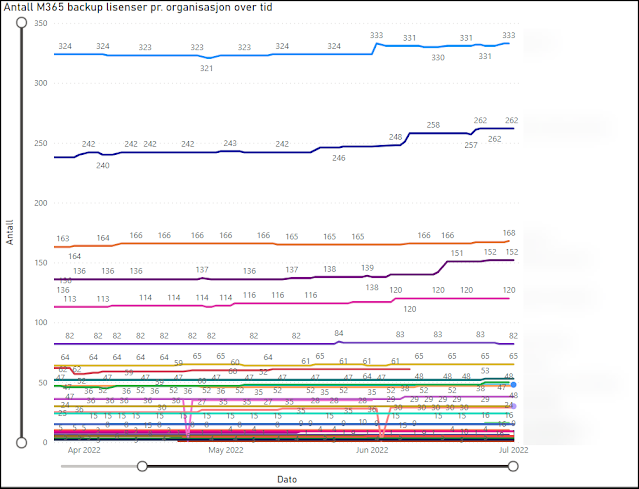
Example of historical development of backup up users pr. company by Veeam 365 backup.

Example of gigabyte compared to number of users pr. company protected by Veeam 365 backup.

Example of usage of the calculated column for GB pr User. Infinity comes from stored data for customers which have terminated their contract where data still exists. This has been removed from the graph with a visuals filter displaying only companies with more than 0 users.


Example of report for repositories with forecast in the Veeam 365 backup service.

This gives a fully automated always up to date reporting solution showing current usage and historical development related to the provided service, license usage and storage consumptions. The reports can easily be filtered by clicking on the values and graphs giving the consumer of the reports the ability to select the desired view. 


The animation is blured to protect the data exposed in the report

If you upload your PowerBI report to the online PowerBI service, you can set the dataset to automatically update directly from the Cosmos Database. This will allow for online consumption of the report from all your devices. One idea could be to add it as a tab in a suitable team channel in Microsoft Teams giving easy access for everyone interested in the topic.

I do believe someone could have interest in the PowerBI Report file, but unfortunately this can't be shared because my reports contains PII data. 

Conclusion

I hope this could inspire someone to dive into data capturing and report building. If you have thoughts, ideas, comments or ideas after reading this far, please add a comment.


Sunday, April 3, 2022

Good insights in Microsoft license usage

Cloud based IT solutions does have a pretty predictive cost when each and every license is based on a price pr user pr month. This should make it easy to budget the cost of each user role. The challenge might be to have an up to date overview of the license portfolio, both current and over time.

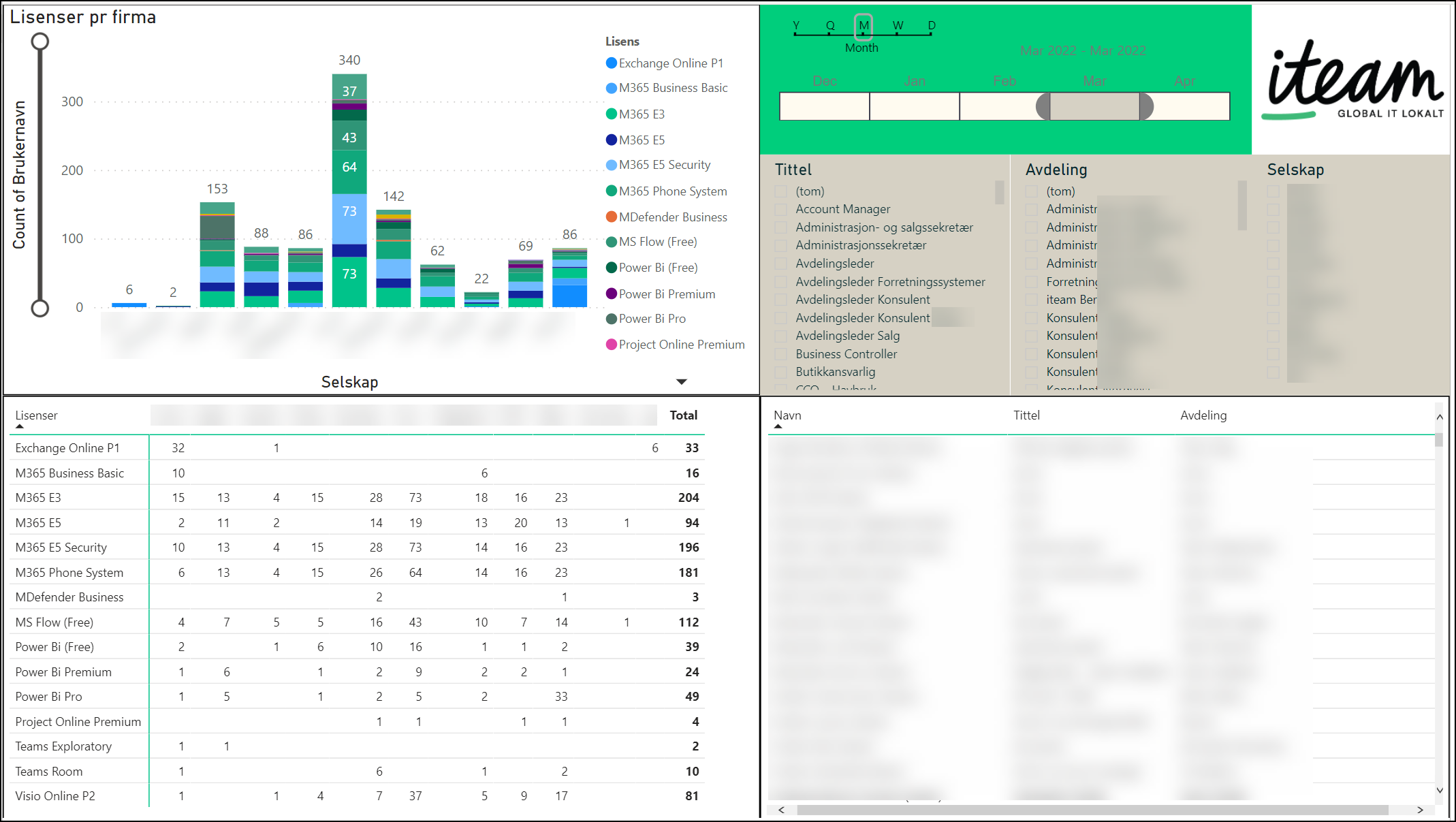
In order to give automated insights to the license situation, I have made a solution which has been installed at several tenants. Based on Microsoft Graph API powershell queries for running in Azure function apps, I am populating license information data from user accounts to a cheap Azure Cosmos DB. These data are then connected to PowerBI where I have created a report giving a detailed insight to the license portfolio pr. company, department, user. The report which can be granulated on year. quarter, month, week or day gives an accurate insight to the consumption of Microsoft licenses in the tenant, which helps address any misconfigurations.

The report has several pages, where the first page gives an overview over license consumption based on company/department with both a graphical and detailed table overview as well as personal details. The report can easily be filtered by clicking on the values in each part of the report.

Click for a larger version

Page two of the report has got a timeline showing the development of Microsoft licenses over time. The report can be filtered by company/department, license or user. This gives an insight to license usage which can't be found elsewhere. The picture below is an example where you clearly can spot a change in SKUs on a large amount of users over time. 

Click for a larger version

In some cases there has been developed even further report pages in order to address the need of insights to the usage of Microsoft licenses, and these reports have several times been used to detect misallocated licenses which in turn have resulted in significant cost savings over time. An example of such report could be the one including groups used to assign licenses to the user accounts.

Click for a larger version

Regarding costs for running the function and cosmosdb in Azure, they seems to be reasonably low. A typically SMB company with arround 200 users shows cost arround 5 NOKs for one month. 

Please let me know if you find this kind of technological usage interesting.

Sunday, April 11, 2021

Kundereferanse: Teams telefoni hos Istad

Teams fra Microsoft samler all kommunikasjon i ett og samme grensesnitt, og gjør det enklere for deg og dine kolleger å samarbeide, uavhengig av tid og sted. Løsningen blir enda bedre når Telenor integrerer telefoni i Microsoft Teams. Det gjør kommuniskasjonen enklere, smidigere og mer effektivt.

Dette er en kundereferanse fra Telenor på en leveranse jeg har levert gjennom Serit. Denne kan sees i sammenheng med tidligere publiserte artikkel om livsforlengende PBX tiltak.


En kunde som har benyttet seg av denne løsningen er Istad Kraftselskap, et lokalt energikonsern med over 100 års historie, som holder til i Romsdal og på Nordmøre.

– Det hele begynte med at vi ønsket å bytte ut all gammel teknologi, og skifte ut de utdaterte telefonsentralene våre, sier Dyre Halse, IT sjef hos Istad.

Allerede i 2008 begynte bedriften å ta i bruk Microsofts chatte og videokonferanse-muligheter for å samarbeide – Office Communicator, Skype, Lync, og nå Teams. I det siste har det blitt enda viktigere for dem å få inn video i disse tjenestene, og dessuten integrere telefonien. Disse løsningene gjør at Halse og hans kolleger kan motta mobilsamtaler enten på mobilen eller på PCen i Teams, alt etter hva som passer. En kan fortsette samtalen en startet på PCen med et tastetrykk til sin mobil osv. Det er Serit Møre som har stått for oppsettet.

Reklamefilm i Telenor sin innpakking


– Du kan si at vi har vært med Istad på reisen helt fra Bell til Bill, altså fra Alexander Graham Bell fant opp telefonen til Bill Gates og Microsoft ledet IT revolusjonen, sier Simon Skotheimsvik, Senior Systems Consultant hos Serit Møre. Serit Møre er et ledende kompetansemiljø innen teknologi og IT-løsninger i Møre og Romsdal, med kontorer i Surnadal, Kristiansund og Molde. 

– Dessuten skjer jo alt i skyen, med alle fordelene det medfører, enten det er enkel oppgradering, bedre sikkerhet eller med det lave fotavtrykket hos kunden, sier Skotheimsvik.


Dyre Halse hos Istad påpeker videre at det å kunne kjøre videomøter der «alt bare fungerer» og du enkelt kan hente opp informasjon fra tidligere møter eller kontaktpunkter, er elementer som gjør Teams så verdifullt for ham og organisasjonen.

– Det er en stor hjelp å kunne hente inn nye kolleger med sin kompetanse når vi trenger dem, det gjør oss mye mer effektive, kan han fortelle.

De opplever også at det å få all telefoni inn i Teams, med to helintegrerte systemer som fungerer så godt og raskt sammen, har gjort en enorm forskjell for kundene deres. Friheten til å ta jobbtelefoner fra hvor som helst, med full Teams-funksjonalitet som kalendre, filer og kontaktinformasjon, gjør arbeidshverdagen uendelig mye enklere. Serit forteller også at Microsoft har gjort en kjempejobb med å legge til rette for dem i forhandler og installatørleddet, så de kan tilby kunder som Istad de beste og nyeste løsningene.


Opprinnelig reklamefilm fra Serit


Saturday, March 28, 2020

Hvordan beskytte den moderne arbeidsplassen?

Korona-pandemien som raser over verden i disse dager har fremskyndet den moderne arbeidsplassen. Skytjenester og den mobile arbeidsstokken har redefinert sikkerhetsperimeteret. IT miljøene flytter seg fra bedriftens lokale nettverk til skybaserte miljø. Data lever utenfor bedriftens nettverk og deles aktivt med eksterne samarbeidspartnere, leverandører og kunder. Ansatte tar i bruk sine egne enheter og jobber stadig mer fra hjemmekontor. I dette bildet trengs en ny sikkerhetsmodell som effektivt tilpasser seg det moderne miljøet. La oss snakke litt om Zero Trust og hvorfor det er ekstra viktig i disse dager.

Zero Trust er ikke en enhet eller et enkelt produkt man kan kjøpe. Det er mer en metodikk som benyttes for å sikre bedriftens data. Det nye sikkerhetsperimeteret er ikke lenger definert av en organisasjons fysiske lokasjoner – den er nå strekt ut til alle lokasjoner og enheter som kjører, lagrer eller aksesserer bedriftens digitale ressurser og tjenester. Dette skjer ofte utenfor bedriftens lokasjonsbaserte sikkerhetsløsninger basert på brannmurer og VPN forbindelser. Bedrifter som utelukkende benytter slike tradisjonelle sikkerhetsmodeller, greier ikke å få den nødvendige ende til ende sikkerheten som den moderne arbeidsplassen krever. Dagens sikkerhet må omfavne den moderne arbeidsplassen og beskytte individer, enheter, applikasjoner og data uansett hvor de måtte befinne seg. Dette er kjernen i metodikken som kalles Zero Trust.

Nå jobber flere enn noen gang fra hjemmekontor samtidig som data og applikasjoner flytter ut i skyløsninger. Da er man ikke nødvendigvis lenger beskyttet bak den flotte brannmuren på kontoret, og det er derfor viktig at IT løsningene sikres på nye måter.

Hva går Zero Trust ut på?

For å forklare dette på en enkel måte er prinsippet for Zero Trust å ikke stole på noen, verken personer, lokasjoner eller enheter. Alt må verifiseres før tilgang blir gitt. Personer og enheter må kunne verifisere seg før de får tilgang på de dokumenter, applikasjoner og data som de har tillatelse til. Dette må fungere uavhengig av om man er innenfor eller utenfor kontoret. Ansatte tar i dag med egne enheter og jobber fra hvor som helst uten å være innom bedriftens lokalnett. Sikkerheten må derfor bygges rundt brukerne, og de må identifisere seg på en trygg måte fra enheter som er verifisert sikre før de får tilgang til å jobbe med bedriftens data fra godkjente applikasjoner. Slik får bedriften sikret seg fra innsiden og ut.


Den tradisjonelle metoden for å ivareta bedriftens digitale eiendom kan minne om en borg med vollgrav basert på sikring av lokalnett, filstrukturer og serverløsninger. Dette har fortsatt en viktig rolle for bedriftens sikkerhet, men vi trenger nye løsninger for å også beskytte oss i dagens skybaserte verden. Vi må sikre påloggingen slik at vi vet med sikkerhet at det er riktig person som får tilgang. Vi må sikre at tilgangen skjer fra en enhet som har god nok helsetilstand, og vi må sikre at det er tilgang til kun de data man skal ha tilgang til på aktuelt tidspunkt. Dette må fungere selv om både brukere, applikasjoner, enheter og data er utenfor borgen og vollgraven.

Mange bedrifter har i dag en praksis som avviker stort fra Zero Trust-metodikken. Mange har hørt om det, men vegrer seg fra å sette i gang tiltak for å få dette på plass – selv om de aktivt bruker skytjenester og tillater tilgang til bedriftens data fra enheter og applikasjoner de ikke har kontroll over. I disse dager er dette et høyaktuelt tema hvor ansatte i tillegg oppfordres til å jobbe utenfor kontoret, på usikrede hjemmenett og gjerne fra dårlig administrerte enheter. Bedriftens data er mer sårbar enn noen gang.

Maskinlæring, kunstig intelligens og automatikk

Organisasjoner må kunne tilby sikker tilgang til sine ressurser uavhengig av brukerens miljø. Før tilgang kan gis, må vi blant annet være sikre på brukerens lokasjon, brukerens rolle, enhetens helsetilstand samt kjenne klassifikasjonen på dataene de ønsker tilgang til. For å få en effektiv håndtering av dette benyttes automatiserte regler, maskinlæring og kunstig intelligens for å få den riktige balansen mellom sikkerhet og best mulig opplevelse for brukerne.
Det har historisk sett vært utfordrende og tungvint å få tilgang til internområder, dokumenter og andre data når du jobber fra andre steder enn arbeidsplassen. Den moderne arbeidsplassen gjør det enklere enn noen gang å jobbe hjemmefra og samtidig opprettholde produktivitet på en fleksibel måte. Zero Trust-metodikken underbygger og sikrer den moderne arbeidsplassen.

Ved å sette opp bedriftens sikkerhetsprosedyrer gjennom en Zero Trust-metodikk, vil den enkelte ansatte få tilgang til det en skal ha på en sikker måte fra hvor som helst i verden. Zero Trust-metodikken er rett og slett en ny måte å drive intelligent sikkerhet basert på automatisk håndheving av sikkerhetsregler for å sikre samsvar med tilgang i hele den digitale reisen. Basert på regelsett i forhold til bruker, enhet, applikasjon, informasjon om plassering og risiko kan man bedre kontrollere hvordan brukere får tilgang til bedriftens ressurser og tjenester. Regelsettene brukes til å bestemme om det skal tillates tilgang, nektes tilgang eller kontrollere tilgang med ekstra autentiseringsutfordringer (for eksempel flerfaktorautentisering), bruksvilkår eller tilgangsbegrensninger. Det hele understøttes av kunstig intelligens og maskinlæring.


Hvordan komme i gang

Sikkerhet er et område som stadig krever ettersyn og utvikling. Microsoft 365 har de verktøy man trenger for komme i gang med en Zero Trust-praksis. Det er viktig å huske at dette ikke er et arbeid man blir ferdig med. En Zero Trust tilnærming bør strekke seg over hele den digitale eiendommen til bedriften. Dette gjøres ved implementasjon på tvers av seks grunnleggende elementer: identitet, enhet, applikasjon, data, infrastruktur og nettverk. Hver av disse elementene er kilder som går inn i håndhevelse av sikkerheten, og er slik sett viktige områder å fokusere på.

Identitet

Uansett om det gjelder personer, tjenester eller internet-of-things (IOT) enheter, har de identiteter som inngår i kjernen av Zero Trust. Ved tilgang til en ressurs, må identiteten verifiseres på en sikker måte og sjekkes opp mot gyldighet, normaliteter og tilganger. Med Azure Active Directory (Azure AD) og Intune kan bedriftene være trygge på at mobile ansatte kan få tilgang til ressurser på en sikker måte, uten at det går ut over produktiviteten. Når man jobber fra usikre nettverk kan man skru på MFA (Multi-faktor-autentisering) som vil sørge for at brukerne må bruke en form for bekreftelse på at de er den de utgir seg for å være før de får tilgang. Her kan man også benytte betinget tilgang basert på en total sikkerhetsvurdering knyttet til enhet, lokasjon, tidspunkt med mere.
Tradisjonelt identifiseres identiteter ved brukernavn og passord uten enhetlig pålogging mellom tradisjonelle systemer og skybaserte tjenester. En mer avanserte form gir integrerte og federerte løsninger, betingelsesbaserte tilgangsløsninger med tilhørende analyser. Den optimale løsningen har passordløs tilgang og sanntids risikoanalyser.

Enhet

Identitet og enheter er de primære elementene for sårbarhet i et cyberangrep. Når identiteten har fått tilgang til en ressurs, kan data flyte til en mengde forskjellige enheter som IOT enheter, smart telefoner, private enheter og administrerte bedriftsenheter. Dette mangfoldet gir en massiv angrepsflate, noe som krever overvåking og strenge krav til enhetens helsetilstand og samsvar for å sikre tilgangen.
I en tradisjonell løsning er enhetene administrert gjennom tjenester som krever tilstedeværelse på lokalnettet til bedriften. I en mer avansert løsning er enheten registrert mot skybaserte løsninger for drift. Den optimale løsningen har automatiserte tjenester for deteksjon og monitorering.

Applikasjon

Data blir betjent i applikasjoner. Dette kan være alt fra tradisjonelle lokale applikasjoner til skybaserte tjenester. Her må man sikre at rettigheter og tilganger blir ivaretatt. Her må man kunne kontrollere og sikre eventuell bruk av applikasjoner som brukerne innfører (skygge-IT). Løsningen må overvåke og ha sanntids analyse for å avdekke unormal adferd.
Tradisjonelt sett er applikasjoner tilgjengelig på fysiske lokale nettverk og over VPN løsninger. Mer avanserte løsninger gir tilgang over internett med enhetlig pålogging (SSO) hvor kritiske applikasjoner er overvåket og kontrollert. En optimal løsning gir tilgang til alle applikasjoner med minste tilgangsrettigheter hvor man også har overvåking og monitorering på alle skybaserte applikasjoner.

Data

Bedriftens data representerer bedriftens verdi, og de bør være sikre selv om de skulle forlate enheter, applikasjoner, infrastruktur og nettverk som er under administrasjon av bedriften. Data bør derfor klassifiseres, merkes og krypteres. Tilgangskontrollen kan så bestemmes ut fra attributtene tilhørende dataene.
Tradisjonelt sett har man styrt tilgang basert på perimeter tilgang, og ikke dataenes sensitivitet. En mer avansert metode er å klassifisere og merke data, samt kryptering av data. Den optimale løsningen bygger på maskinlæring, skybaserte sikkerhetsregimer og regelverk for å hindre datatap med kryptering og sporing.
Nettkriminelle ønsker å få tak i bedriftens data – for å kunne bruke dette på en eller annen måte – enten det er for å kryptere filer eller stjele informasjon. Med Microsoft Information Protection, kan man forbedre beskyttelsen av sensitiv informasjon—uansett hvor informasjonen befinner seg. Dataene vil kunne beskytte seg selv uten å måtte ligge i en gitt filstruktur. Microsoft 365 gjør det mulig å:

  1. Identifisere og klassifisere sensitive data manuelt og automatisk
  2. Bruke fleksible beskyttelsesregler.
  3. Overvåke og utbedre sensitive data som er i faresonen.

Infrastruktur

Telemetri bør benyttes for å oppdage angrep og unormal adferd knyttet til infrastruktur for å automatisk blokkere, varsle og ta beskyttende handlinger. Med Microsoft 365, kan bedrifter styrke sin evne til å beskytte, oppdage og svare på angrep med Microsoft sin integrerte og automatiserte sikkerhet. Her benyttes Microsoft Intelligent Security Graph og avansert automatisering som er drevet av kunstig intelligens (AI) for å forbedre identifisering og respons av hendelser. Slik kan sikkerhetstrusler løses nøyaktig, effektivt og raskt.

Nettverk

Alle data blir konsumert over nettverk, og kontroller i nettverket kan bidra til å hindre at angripere beveger seg sideveis gjennom nettverket. Nettverk bør derfor være segmentert og ha sanntids beskyttelse, kryptering, monitorering og analyse implementert.
Microsoft 365 vil forenkle administreringen av sikkerheten dersom man ønsker å få på plass en Zero Trust-metodikk.

Når du skal vurdere hvordan du skal sikre dine data, enten de finnes i skyen eller på servere, vil vi anbefale en Zero Trust metodikk som den best egnede praksisen. Bakgrunnen for dette er hvordan arbeidssituasjon er for mange i dag – og vil være i all tid fremover. Metodikken er mest effektiv når den er integrert over hele den digitale verdikjeden. De fleste organisasjoner vil ha en fasebasert tilnærming rettet mot bestemte områder. Dette bygger ut fra modenhet, tilgjengelige ressurser og prioriteringer. Det første trinnet på reisen trenger ikke å være et stort løft eller en total omlegging, men gjerne en forlengelse av eksisterende løsninger og investeringer. Hvert steg på veien vil utgjøre en forskjell med tanke på å redusere risiko og sikre den digitale eiendommen. Det viktige er her å komme i gang.

Microsoft 365 kommer i ulike utgaver hvor man kan velge de verktøy og funksjoner man trenger. Med riktig nivå på grunnsikringen kan du fokusere på innovasjon og utvikling av egen forretningsdrift.

Relevante artikler:

Artikkelen var første gang publisert som en av flere artikler fra Simon på serit.no

Monday, July 10, 2017

IT - En verden i rask endring

Skiftningene i den teknologiske verden går stadig raskere. Endringer i teknologiske livsløp ble tidligere målt i dekader. Nå er endringene vanskelig å måle med sin flytende utvikling i skyen. For kort tid tilbake hadde alle organisasjoner egne IT personell for å drifte tung IT infrastruktur under eget tak. Vi ser nå at de tradisjonelle maskinrommene smuldrer bort sammen med det lokale IT personalet. Greier organisasjonene å henge med?

Den tunge infrastrukturen med store serverparker ute hos kunder forvitrer og løsninger materialiseres i skyløsninger. Krympede serverparker gir erfaringsmessig kutt i IT stillingene ute i næringslivet. IT-miljøene i SMB markedet forvitrer.

Samtidig som maskinrommene krymper ser vi at teknologien på arbeidspultene vokser. Det er stadig flere enheter koblet til nett pr ansatt i firmaet. Tendensen er også at de ansatte i større grad enn før ønsker å kunne bestemme egne plattformer å jobbe fra. Dette stiller også nye krav til rutiner rundt anskaffelse, drifting og avhending av teknologisk utstyr. Ansatte har gjerne også egne enheter som de ønsker å benytte i jobbsammenheng. De teknologiske grensene mellom jobb og privatliv viskes ut. 

Dette stiller nye krav til IT drift og sikkerhet i organisasjonen. Et større antall enheter pr. ansatt gir større behov for brukerstøtte. Antallet enheter gir større angrepsflater, spesielt om en andel av enhetene er i privat eie. 

Totalen av dette gir nye behov for driftsstøtte og tilgang til en kompetent Helpdesk som sluttbrukerne kan støtte seg direkte til. 

Microsoft er bygd ut for å støtte opp under de IT behovene som næringslivet har i dag. Der finnes verktøy for å underbygge de nye moderne driftsbehov.

Relevante artikler:

Artikkelen var første gang publisert som en av flere artikler fra Simon på serit.no


Corporate Headshots - Social Media for Business

First impressions will always be important, but now that we conduct so many of our initial interactions online, virtual personal branding has become as important as the firm handshake once was in introducing yourself to the world. Hence a corporate headshot is an opportunity to portray a brand image to potential customers.

In business we spend a lot of money on branding across logos, websites, literature, packaging and premises. Is the photographic representation of you and your coworkers the place to scrimp on branding? Probably not. Whether you are posting your headshot on you Companys website, or want to post it on social media pages, you are always representing your business in one way or another. A professional headshot will put confidence into you business and make your clients more willing to deal with you.

Think about it for a moment - if you were searching for a new supplier and found that a certain company was a very viable supplier, but the corporate headshots had an unprofessional style - would you be willing to deal with this company? If you want to get the most out of your digital presence, a professional corporate headshot will allow you and your colleges to achieve a good appearance.

Getting the most from your head shot

If you decide to make corporate headshots of you and your company, you will have to deal with a lot of questions related to dress codes, style of the images etc. You need to book a photographer and put up a schedule for your co-workers to get photographed.
Me doing corporate headshots of  a company

Pictures received - now what?

Once the photo session is finished you will receive a portfolio of pictures from the photographer. Now you need a plan how to distribute and use these pictures in order to give the best return of Investment.
Corporate Headshost received - time to distribute and use the pictures
Social Media has been a large consumer of headshots for a long time. We have also seen headshots as impersonators in corporate software for a while. The challenge now will be to utilize the new portfolio of headshots over the wide array of software og systems supporting personal portraits.

Active Directory, Exchange and Skype for Business

Portraits can be added to each user account in Active Directory as a thumbnail. There are several tools available for this operation out on the wild internet. We have preferred a PowerShell script to deal with this operation. Pictures are being adjusted and exported to a folder in the format of sAMAccountName.jpg. The Powershell script will then add the corporate headshot to the correct person in Active Directory. The debut of Exchange 2010 and Outlook 2010 made the portrait from AD available in Exchange Global Address list. All out of sudden the new headshots are available in the Outlook clients to all employees in the company.
Corporate Headshots available in Exchange and Outlook
The thumbnails uploaded to Active Directory will also be visible for colleagues in Skype for Business:
Corporate Headshots as viewed in Skype for Business
AD-integrated thumbnails in Skype for Business will only be visible to internal users. Federated users will not have read access to the picture stored in Active Directory. In order to make your thumbnail portrait visible to federated partners you need to tweak your Skype for Business to allow pictures from a website. With this option available we can pick a portrait available on the Internet as a thumbnail photo in Skype for Business.
In order to have a streamlined distribution of the corporate headshots, we have created a website on the Skype for Business server with all headshots available in correct format. The website is populated with images from the same Powershell script populating AD with thumbnail photos. This will give all users a Skype for Business uniform corporate portrait visible to everyone - internally and externally!
Example of Skype for Business meeting where pictures of federated users are missing

3rd party systems

The Powershell script used for distribution of the corporate headshots can easily be customized to distribute pictures to other 3rd party systems. The following list contains examples of 3rd party systems where the powershell script has been used for picture distribution.

Trio Enterprise

Trio Enterprise has options to have corporate headshots for each individual person registered in Company Directory. Company Directory can be set to synchronize with Active Directory, but the thumbnail photo from AD can't be directly synced to Company Directory. By customizing the PowerShell script for distributing the corporate headshots, we have managed to incorporate Trio Enterprise into the automated picture distribution. Here are some examples of pictures as they appear in Trio Enterprise:
Corporate Headshot in Trio Enterprise Attendant

Corporate Headshot in Trio Enterprise Web Assistant

Corporate Headshot in Trio Enterprise Web Assistant

Web based solutions

The pictures has also been distributed to 3rd party web based solutions with information based on AD giving phone lists, employee lists, organization charts, doorsigns etc. These are handy tools for new coworkers in the company to match names and faces. Some screenshots just as an example:

Organization Chart with headshots

Department list with headshots

Title list with headshots

User information with headshot

Doorsign template with headshot

Contact Card VCF file

The best way to distribute your contact card in a digital way, is by use of VCF Contact Cards. These cards can in fact also contain a portrait. This will effectively distribute the new portraits and updated personal details to your contact persons outlook and mobile phones. The PowerShell script used to distribute the Corporate Headshots can also distribute pictures to be used in a VCF Contact Card routine. I have earlier described a routine for setting the Outlook Auto Signature based on details in AD. This has in some circumstances been extended to give a shortcut to an downloadable VCF file with appropriate updated contact details - included a fresh user portrait!.
Outlook AutoSignature with shortcut to updated VCF file


VCF file with updated details and corporate headshot

Windows 10 Profile Picture

Some fantasy and creative use of PowerShell and Group Policy can also automatically distribute the Corporate Headshots from AD as profile picture in Microsoft Windows 10.
Corporate Headshot as profile picture in Windows 10. ScreenLock background is also centrally managed.

Corporate Headshot picture in Windows 10

Office365

Microsoft Office 365 has Corporate Headshots heavily integrated in all services and modules. We have expanded the Powershell script to distribute the corporate headshots also to this platform. This gives the platform an extra social profile.
An example of corporate headshots in Delve from Microsoft Office 365

Corporate Headshots and other graphical branding through scripting

Scripting and customization of your standard products used by your employees on a day to day basis can take your branding interests to a higher level. This blog post has focused on corporate headshots. It could have been considerable longer if I did include other graphical branding possibilities available in your standard products in use at the office. 

A security concern!

Please do remember - these are small steps helping you increase your security since it will give your services a branded look which differs from standard solutions!

I would love to help you with these concerns! Please comment if you have a good story, some needs or experience related to this topic!