Showing posts with label Endpoint. Show all posts

Monday, December 12, 2022

The new multiple administrative approvals experience

Imagine a compromised administrative account going wild in your Intune environment. Wouldn't it be great to protect your configuration with a second factor, like MFA? Join me while I experience the new Multiple Administrative Approvals (MAA) feature for Intune which is out in public preview! 


By using Intune access polices we can require a second administrative account to approve changes in the environment before they are applied to the production environment. This can give associations to MFA (Multi Factor Authentication), but let's welcome MAA (Multiple Administrative Approvals) instead.

Tuesday, December 6, 2022

HP Connect for Intune, Part2: BIOS Authentication

This is part 2 in my series of blog posts covering HP Connect for Intune. The first post covered how to get the BIOS patched to the latest release. Today I cover the BIOS authentication, which is an important aspect of managing, controlling and securing Windows devices. If the BIOS can be accessed without authentication, a local or remote user may be able to disable basic security features, perhaps introducing malware early into the startup process that Windows may not protect against.  


The ultimate goal is to have a security boundary covering all aspects from chip to cloud. An UEFI BIOS is the chip containing the hardware start-up code and many settings that should be secured prior to booting into a Windows Operation System. We will manage the BIOS security limiting setting changes only to users or administrators with knowledge of the authentication mechanism. 

Please note: This is not a sponsored post!

Wednesday, November 30, 2022

The new Microsoft Store Experience

There is a new integration available between Microsoft Intune and the Microsoft Store for managing app installations from the cloud. This allows admins to easily browse, deploy and monitor applications. The new feature is powered by WinGet, the new windows package manager. I will explore this new feature in this blog post.

Intune has for a long time been great at getting policies and aps on to devices. The challenge has been to get new applications ready for provision in Intune. Whit this new feature, Independent Software Vendors (ISV) can publish and maintain their packages directly to this solution. This will ease the process and the burden of application management. 


With direct access to the apps in Intune, they can easily be made available fast and easy for user's self-service through the Company Portal. This is perfect for locked down environments where users have no local admin rights on their computers 

Thursday, November 24, 2022

Let Intune stimulate mobile updates

Mobile devices can be a challenging asset to manage and keep secure with their many variations in ownership, management and operating systems. This blog post will give you some ideas on how you can enforce a minimum version of the operating system on the mobile phones accessing the company's data in Microsoft 365.

The cell phone is for many users the edge of privacy where they can accept the company's administration. At the same time, it is important for the company to have control over its data and applications. 


An important prerequisite must be set from the orgranization - Yes, users can have access to data, under defined conditions. One important security measure is to ensure updated software regardless of management mode. Let us dive into the condition of having updated operative systems on the mobile device accessing company data.

Thursday, September 29, 2022

Branding your tenant and managed endpoints

A clear brand builds identity and affiliation. Microsoft 365 and Endpoint Manager has a rich set of tools for customizing your brand into the products. This will look nice and integrated, and it will help the end users detect security attacks. Let's take a deep dive into the possibilities associated with branding your tenant and endpoints!


A brand is a name, term, design, symbol or any other feature that distinguishes one company's good or service from those of other companies. Brands are used for recognition, creating values and identification. A brand is the sum of all expressions by which an entity (person, organization, company, business unit, city, nation, etc.) intends to be recognized.

With a workforce spread all over the modern hybrid workplace, it is more important than ever to spread the love of the company's brand. This blogpost will focus on how your brand can be incorporated to Microsoft 365 and all endpoints by Microsoft Endpoint Manager.

Friday, September 16, 2022

Building a MEMpowered LAB environment


In my early days as consultant within Microsoft technologies, I had complete lab environments running as virtual machines on heavy workstation laptops. Through the years as I have migrated to a cloud first philosophy, my lab environments have followed along. Working mainly with Microsoft 365 and Microsoft Endpoint Manager, my lab environments are now cloud based. 

I still remember making a decision moving from high performance laptops hosting all my virtualized lab environments. Looking back to my first switch to a lightweight Surface, I don't regret. The new light weighted devices powered by the cloud has been fantastic in my everyday work life. But - I still need environments to test and verify technologies and ideas before putting them to production. This blog post will cover some ways to build lab environments for the cloud based Microsoft solutions.


Friday, September 2, 2022

Unboxing: Philips P-Line 499P9H 49" DQHD SuperWide 32:

When spending hours, days, months and lifetime in front of a computer, a good monitor is essential for the workplace. Personally I prefer large monitors with huge resolution to get enough space to work efficiently with Microsoft 365, Endpoint Manager, scripting and automation. Traditionally I have used 3 to 4 monitors lined up. I will now share my experience after migrating to one single superwide screen. will it fulfill my needs and expectations out of the box, or do I need to do some hacks?

Please note: This is not a sponsored post!

The Philips 499P9H Hard Facts

The monitor I am installing is the Philips P-Line 499P9H 49" DQHD UltraWide 32:9 Curved which is like two full-size QHD monitors in one with its 5120x1440 resolution. It has a built in USB-C docking station and a pop-up webcam supporting Windows Hello!


Tuesday, September 1, 2015

The migration from Workstation to Surface

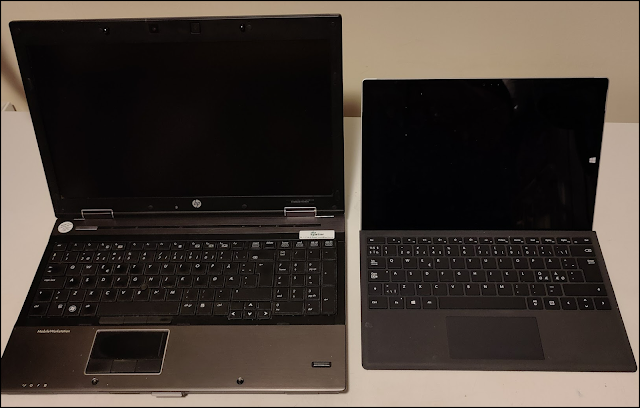
I have always sticked to high end, expensive, heavy and noisy laptops in the workstation genre. Recently I decided to test out a more lightweight tool and exchanged my HP Elitebook 8540w with a Microsoft Surface with Windows 10 Enterprise. Here are some experiences from this travel.


The physics

When changing from the Elitebook to the Surface I did miss the built in SIM card, the numeric keypad, the full-size keyboard, the DVD unit, a bunch of USB ports and the fingerprint reader. At the same time I did loose a lot of heavy weight, both on the computer itself, but also at the power supply! The new Surface Pro 3 is the one with the highest technical specification, but it is still a light weighted unit. I do believe that the external power supply unit for my old workstation was heavier than the new Surface device.
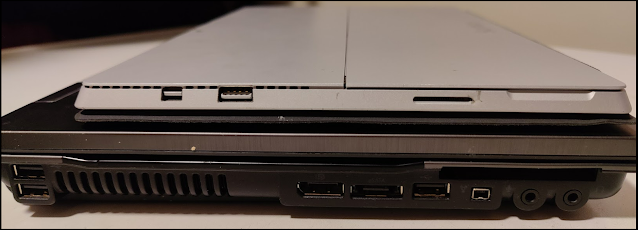
The Surface is smaller, but it is lacking the connections I have been used to on my workstation

The keyboard

I was kind of skeptical to the new keyboard. It seemed to be of a poor quality, but it has surprised me in a positive way. It is great to use in my daily consultancy work out at customers where the keys feels good and responsive and the trackpad is Ok. I had to learn a couple of new keyboard shortcuts (screenshot etc), but that was not a problem - #neverstoplearning! It is also easy to remove the keyboard from the device giving me a super handy and powerful tool for field work.
Don't underestimate this keyboard - it is actually pretty ok

The monitor

I like the monitor a lot. It has a lovely resolution with great colors, and not to forget - it is a touch monitor. The touch function has been used more than I could ever imagine. I use it for scrolling, zooming and navigating. The touch screen in combination with the pen gives me a whole new integrated way of using my Windows device.

The missing interfaces

As mentioned, I was kind of skeptical to the missing interfaces. I have been used to have a built in SIM card, numeric keypad, full-size keyboard, DVD unit, fingerprint reader and a bunch of USB ports. The new Windows Surface device had one (1) USB port! But - I am willing to give this a test drive! After all when I am at my office (at work or home), the device is connected to docking stations with external devices compensating the peripherals, and in fact I can't remember the last time I really needed a DVD unit. As far as the SIM card, I can always share internet from my cell-phone whenever I am out of service for a decent Wi-Fi network.

My conclusion

After some time of usage, my personal conclusion is positive - very positive. The device is a high performance device serving me well. It is a light weighted device allowing me for a lighter commute. 

I notice that more of my work is relating towards cloud work, and the Microsoft Surface seems to be a perfect match. Normally a travel to the cloud means a lot of noise, but not this time - the noise level has been significantly reduce on my switch from the Elitebook to the Surface device!