Thursday, September 29, 2022

Branding your tenant and managed endpoints

A clear brand builds identity and affiliation. Microsoft 365 and Endpoint Manager has a rich set of tools for customizing your brand into the products. This will look nice and integrated, and it will help the end users detect security attacks. Let's take a deep dive into the possibilities associated with branding your tenant and endpoints!


A brand is a name, term, design, symbol or any other feature that distinguishes one company's good or service from those of other companies. Brands are used for recognition, creating values and identification. A brand is the sum of all expressions by which an entity (person, organization, company, business unit, city, nation, etc.) intends to be recognized.

With a workforce spread all over the modern hybrid workplace, it is more important than ever to spread the love of the company's brand. This blogpost will focus on how your brand can be incorporated to Microsoft 365 and all endpoints by Microsoft Endpoint Manager.

Friday, September 16, 2022

Building a MEMpowered LAB environment


In my early days as consultant within Microsoft technologies, I had complete lab environments running as virtual machines on heavy workstation laptops. Through the years as I have migrated to a cloud first philosophy, my lab environments have followed along. Working mainly with Microsoft 365 and Microsoft Endpoint Manager, my lab environments are now cloud based. 

I still remember making a decision moving from high performance laptops hosting all my virtualized lab environments. Looking back to my first switch to a lightweight Surface, I don't regret. The new light weighted devices powered by the cloud has been fantastic in my everyday work life. But - I still need environments to test and verify technologies and ideas before putting them to production. This blog post will cover some ways to build lab environments for the cloud based Microsoft solutions.


Friday, September 2, 2022

Unboxing: Philips P-Line 499P9H 49" DQHD SuperWide 32:

When spending hours, days, months and lifetime in front of a computer, a good monitor is essential for the workplace. Personally I prefer large monitors with huge resolution to get enough space to work efficiently with Microsoft 365, Endpoint Manager, scripting and automation. Traditionally I have used 3 to 4 monitors lined up. I will now share my experience after migrating to one single superwide screen. will it fulfill my needs and expectations out of the box, or do I need to do some hacks?

Please note: This is not a sponsored post!

The Philips 499P9H Hard Facts

The monitor I am installing is the Philips P-Line 499P9H 49" DQHD UltraWide 32:9 Curved which is like two full-size QHD monitors in one with its 5120x1440 resolution. It has a built in USB-C docking station and a pop-up webcam supporting Windows Hello!


Monday, August 15, 2022

Automating Teams voice reporting of users (2:2)

This is a follow up on my last blog post covering automated teams voice assignment for users. This time I will cover how the mentioned routine has been expanded to do reporting in PowerBI to show evolution and distribution throughout the lifetime of the service.

After running my routine of automated voice assignment in Teams for a while, I felt the need to have an overview of the solution and how it evolved.


Monday, August 8, 2022

Automating Teams voice assignment for users (1:2)

In order to manage voice and phone number assignments in Microsoft Teams, you need at least Teams Communications Administrator role. This role does however have more privileges than most organizations want to assign to their first line staff. This blog post will cover a way for first line to automate voice activation of users with the granularity necessary to cover several technologies such as Direct Routing and Operator Connect.

The main idea is to let first line operators use the tools they have access to when managing users without the demand of acquiring extra privileges.


By adding the Teams phone number in E.164 format to the users telephoneNumber field in AD/AAD and assigning the user as member of a defined security group, I have enough information to automate the Teams voice assignment for the user. This could also include license assignment through the group membership.

Monday, August 1, 2022

Find where your colleagues are on a floor plan

Microsoft Search helps users find relevant content, the right answers or people. Search administrators use their knowledge of the organization and its users to make it easy for users to find the relevant content. This blog post will cover how you can prepare information about employees in order to place them on a floor plan for the office buildings. 

This type of setup is part of my mindset of using as many features as possible from the Microsoft 365 licenses, often triggered through configuration and maintenance of information which provides value throughout the product line.


This kind of functionality will add value when searching for colleagues in the office landscape, or even when searching for the closest meeting room.

Monday, July 25, 2022

Autopilot - Device deadlock between two tenants

After wiping a Windows10 Autopilot device from Microsoft Endpoint Manager, we got welcomed to the correct tenant by name and logo. When signing in with a current licensed user, we got the message saying "That username looks like it belongs to another organization. try signing in again or start over with a different account". Time to troubleshoot!

The background for the wipe was to repurpose the device for a new user. 


Windows Autopilot is managed and maintained by Microsoft in a backend database that associates hashes with customer tenants. This time I got a schizophrenic device dealing with two tenants.

Monday, July 18, 2022

Disable "Do Not Send a Response" option in Outlook with MDM

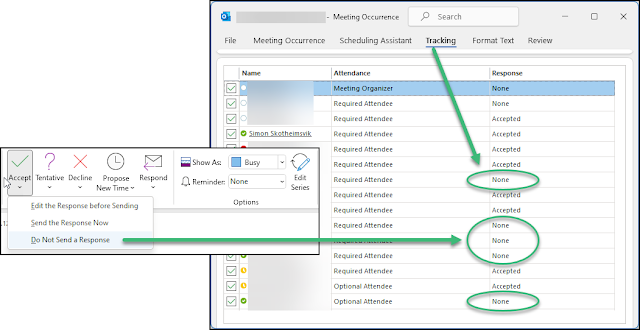
When users select the option to not send a response when accepting a meeting invite in Microsoft Outlook, their response is not visible for the invitee. This makes it troublesome to keep track of attendees for the meeting. This is why many organizations want to disable this option. 

If someone replies to a meeting invite by using the "Do Not Send a Response" option, the action is marked in the users calendar, but it will not reflect in the meeting tracking visible for invitees.


The problem has been present for a long time, and there has been some information available on how this can be solved by use of Group Policies in legacy Active Directory environments. Here's how to remove the option to not send a response on meeting invites using Configuration Policies in Microsoft Endpoint Manager and a Settings Catalog profile type.

Tuesday, July 12, 2022

Posten inn i Homey

Inspirert av lærdommen fra prosjektet med å få Min renovasjon inn i Homey har jeg kastet meg over Posten sin løsning for å se om jeg kan få lest inn postbudets rute som variabler i min Homey.

Posten.no

Posten leverer nå ut post annenhver dag. Dette betyr postombæring mandag, onsdag og fredag den ene uken og tirsdag og torsdag den andre uken. Det kan jo være mulig å enkelt reprodusere denne takten ved hjelp av oddetall og partalls uker. Men - posten har jo laget en egen webside hvor man kan slå opp når man kan forvente post utlevert: https://www.posten.no/levering-av-post. Dette betyr kanskje at det kan oppstå uregelmessigheter her - og det må jo fanges opp av et smart hus.

Monday, July 11, 2022

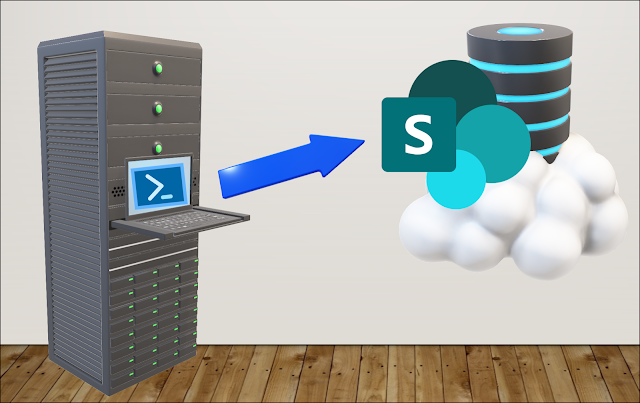
Automatic file upload from legacy server to Microsoft 365

Companies that have gone through several generations of IT systems will have to make their cloud journey in small steps - system by system. Devices and document storage are quickly moved to Microsoft 365. Special Line of Business systems may take longer to cloudify. This can present challenges in making data from dinosaur systems available to users of the modern Microsoft 365 platform.

The challenge from a real world scenario

I was challenged by a customer with a production environment running in an old on premises environment while all users and endpoints had converted to Microsoft 365. They had challenges in reaching reports that were produced on premises and needed a solution to have this data automatically uploaded to Sharepoint for easy and modern access. Challenge accepted!

Wednesday, July 6, 2022

HP Connect for Intune, Part1: BIOS Update

To be certain we have a secure system from chip to cloud, it is fundamental to boot device from a trusted BIOS - often referred as secure boot. HP Connect for Microsoft Endpoint Manager is a cloud application designed to ease the management of UEFI BIOS on supported HP systems. This blog post will cover updating the BIOS on HP devices using MEM.

We need to have control of the boot environment of our managed devices

Please note: This is not a sponsored post!

Tuesday, July 5, 2022

Fortinet VPN Profile distribution with MDM

Fortinet Document Library has a documented routine for distributing the FortiClient application with Intune to Microsoft Windows. This routine is working Ok, but it is missing information on how to distribute the VPN profiles to the client. This will be the topic for this post.

Installation of the FortiClient application

Please read and follow the document in Fortinet Document Library covering the topic of configuring the FortiClient application in Intune. During this routing you need to download the current FortiClient VPN client and start the downloaded EXE file to download the actual MSI installation. This could be wise to do in a Windows Sandbox environment. You will find the MSI file in the newest folder with {randomguid} name under %localappdata%\Temp\.

After this routine has been setup and you have the app distributed to a group and installed, you will find the application available in the system tray on the devices.
FortiClient without VPN profile

The problem here, is the missing VPN profile for connecting your client to the service.

Monday, July 4, 2022

Min Renovasjon inn i Homey

Jeg har lenge ønsket å få informasjon fra vårt renovasjonsselskap RIR inn i mitt smarthus slik at jeg kan få målrettet varsel om dette sammen med annen varsling som huset gir oss. I forbindelse med at Homey slapp funksjonen advanced flow 01.07.2022, kom det ett innlegg i facebook gruppen Athom Homey Norge fra Vegard Hamar som viste en metodikk for å få dette på plass. Det krevde litt spekulasjon for å kunne gjenskape dette. Legger her ut mine notater slik at kanskje flere kan ha glede av dette.

Min Renovasjon

Vårt renovasjonsselskap RIR benytter løsningen Min Renovasjon for varsling av tømmedager. Vegard Hamar skriver i sitt Facebook innlegg at han har hentet inspirasjon fra et GitHub prosjekt for Home Assistant som går mot Min Renovasjon.