Friday, September 30, 2016

MSIgnite 2016, Day4

15,5 hour since I left the hotel. Almost 13.000 steps on my pedometer. A day full of great sessions topped with an awesome Microsoft Attendee celebration. It's late, but I need to preserve some memories.

First session first: "Enabling mobility with Skype for Business" held by Praveen Maloo. This session did review all the features across the different mobile plattforms with lots of good demos on the Skype for Business mobile apps and integrations with the Outlook app, iOS 10 and more.

Praveen Maloo starting his SfB Mobile Client session
The new iOS10 integrations are demonstrated - here is a SfB call answered from the lock screen
My second session was Brian R. Ricks talking about "Configure Skype for Business for Skype Room Systems, Project Rigel and Surface Hub". This in-depth session described how to properly setup the overall environment in order to have best best possible experience from Microsoft Surface Hub, Project Rigel and Skype Room Systems.

Brian on stage with a humoristic intro to his good session
First hand information shared by Brian
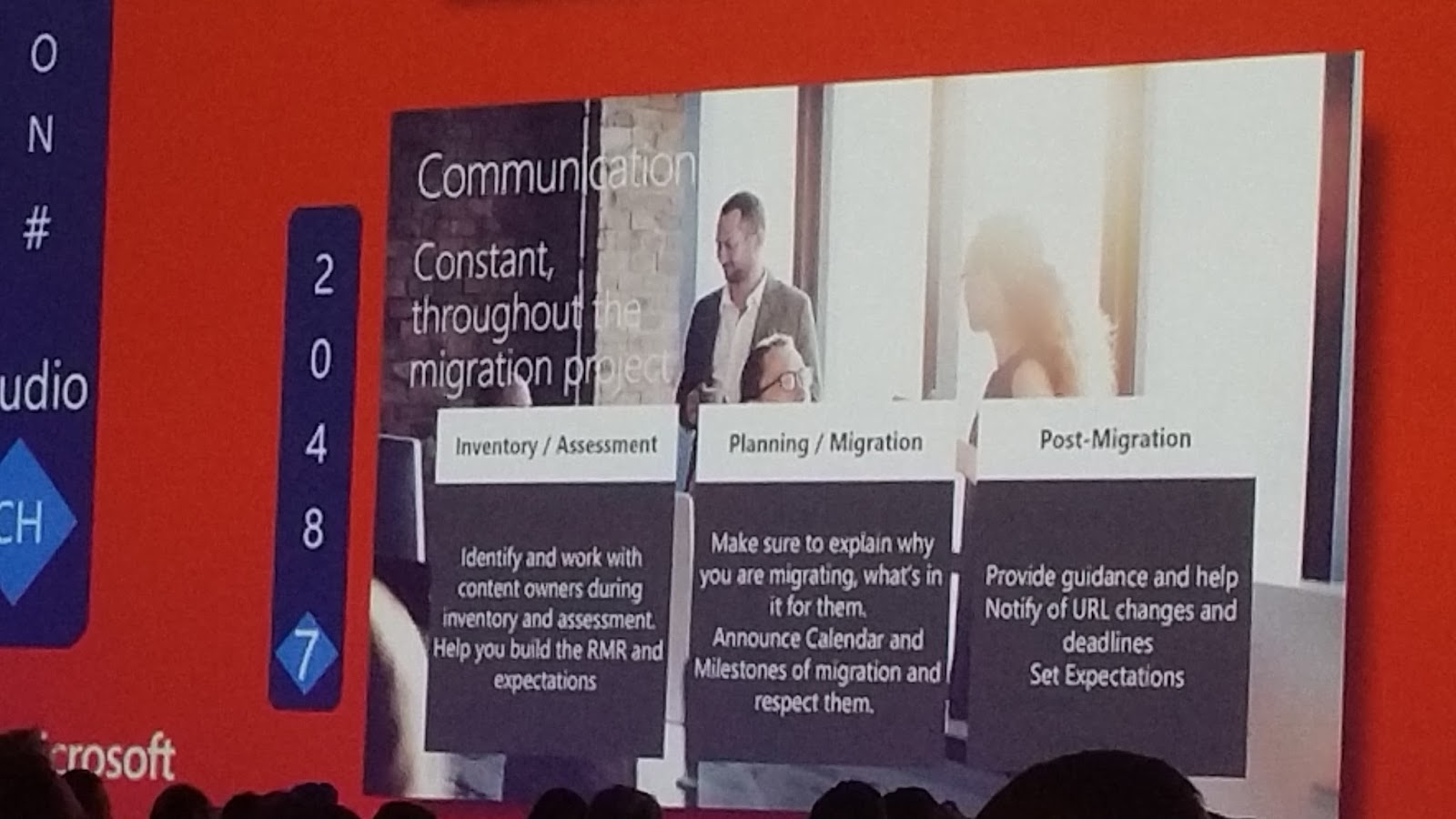
I had planned two sessions as my third session. I didn't figure which one to attend today. Instead I did take an early lunch in the Ignite Hang Out. This turned out to be a good idea since I got my phone charged, I had a nice couch and ok food. With a pair of headset connected to a remote receiver I could also zap between 10 livefeeds from current running sessions at Ignite. I did mostly follow session on monitor 7. The agenda was slightly out of my hardcore areas, but the speaker was really engrossing. Much of the topics could however easily be transferred to any other project involving end users.

3/5 part of the large screen in the Ignite hang out
My personal wireless sound receiver/zapper

Session 2048 turned out to have a good speaker - I need to see this on demand later on
After my lunch I attended a really good session held by Nikolay Muravlyannikov on the topic "Plan for Skype for Business cloud connectivity with Microsoft Office 365". Nikolay was very detailed in his presentation of the two types of connectivity with Cloud PBX and he shared a lot of experience and information. Time well spend!
Nikolay starting his presentation
One of many good slides from Nikolay.
My fourth(?) and last session today was the hardcore depdive "Deploy Cloud Connector Edition with Microsoft Office 365" held by Kerneel Bullens. This session gave an end-to-end description of an CCE Appliance installation. The session was well seasoned with practical tips and tricks from years operating in the MS UC field.
Session from Kerneel is about to start - during his presentation he was constantly walking and talking :)
A good slide from Kerneel describing all the acronyms used within the profession
With such a great line of sessions today I decided to drop my planned Theater session for the benefit of some relaxing in the sun. Time to charge the body for tonights Ignite Attendee Celebration in Centennial Olympic Park! Microsoft had even put om a great troubadour in the park outside the congress center. I did also use some time discovering the surroundings after 4 days mainly inside the Georgia World Congress Center.

Just as I imagined...
The WCC surroundings 
Centinel Olympic park in the front with the Skyline

Downtown
Childrens Museum... Is it the Gravesite?
Entering the camp...
Barbequeue...
The crowded campsite


Thank you Microsoft for a day filled with good sessions, a great camp party with some live banjo music and Tennessee rock from The Delta Saints!

Thursday, September 29, 2016

MSIgnite 2016, Day3

Three days has passed at MSIgnite 2016. Still two more to go, but first a wrap up of some notes to my self from this day stuffed with exciting sessions.

After breakfast I found time to do a spark portrait. As usual I had a sharp eye on the technology. Pretty interesting to see and even hear all the shutters released at the same time for a photo nerd like me. The result:


Session number one was the "Troubleshoot new Skype for Business offerings" held by Jason Collier and Ricardo Garcia. This was a really good deep dive into how to troubleshoot the new SfB offerings. The experienced speakers did share a wealth of information from the nuts and bolts of the most common scenarios. They did also show helpfull tips and tricks through the tools of troubleshooting SfB. A much appreciated session stuffed with valuable technical information. The slide deck will be studied and the session replayed more than once.
Jason, Ricardo and Bryan from yesterdays SOF session
Start with a structured approach for troubleshooting
Gather as much details as possible from the error situation
Classify the issue from the details
Common causes to problems. Note that the Client also needs patching to keep up with the pace of the Cloud
Session number two this wednesday was by William L. Looney: "Troubleshoot Operations with Skype Call Quality Management". Unfortunately he had some demo syndroms, but the essence of the topic was good - this topic has also been mentioned in other sessions so far during this Ignite week.
William Looney on stage

Tool overview for Call Quality management
As my third session today I did choose the "Migrate to Exchange Online via Exchange Hybrid" held by Timothy Heeney and Michael Van Horenbeeck. It's a pleassure to experience such highly related sessions according to my current running projects held by such vital and knowledgeable people. This session did answer quite a few questions. It was a thrill listening to Timothys stories from development spiced with sweet humor. Both speakers had a good flow and high speed. Appreciated!
Thomas Murphy Ballroom was a great arena for som superior speakers

With help of Twitter I got noticed to join the "Plan for Cloud PBX deployment" session held by Jamie Stark. This was also a really good session held by an inspiring and captivating speaker with mint presentation skills, knowledge to the subject and superb flow. The session did cover an overview of all the features of Cloud PBX - from administration capabilities to interoperability to end-user features. Jamie did also have a good live demo of the Cloud PBX admin interfaces.
Jamie Stark getting ready to start his session

Cloud UC presented as the fourth communication era in a credible way (listen to the session on-demand!)
As a final session this day I did enjoy Thomas Poett at the MVP Hub Talk where he gave a good session related to "moving forward with Office 365 and Skype for Business". A dedicated speaker describing some techy SfB stuff from projects.
Poett describes large voice enabled O365 implementations with several SBCs in different parts of the world


It is hard to put one session up against another in order to say if one is better than another. The speakers at Ignite are the best available within their subject. As long as I pick sessions with subjects of my interests, they tend to fit like a glove.

On the Expo floor today I explored more new technologies surrounding Skype for Business and got a chance to tamper with some cool stuff like phones from Yealink, the new meeting room experience from Logitech Smart Dock, Attendant Pro from Landis etc. I even got a chance to explore the Nano server through a pair of Microsoft Hololense!

Yealink T48G. They will come with a T49 with cam as well(!)


So far during my Ignite journey I have tended to attend mainly at UC sessions. Seems like my planned schedule for the rest of my week at Ignite will have even more UC sessions. Oh what a joy!

Today was a special good day at Ignite whit a lot of knowledge captured that will become handy already at Monday. I even got myself a lunch today!


Wednesday, September 28, 2016

MSIgnite 2016, Day2

I am back at the hotel room after day two at Microsoft Ignite 2016 in Atlanta. Better knowledge to the buildings and a looser schedule gave a lower number on the pedometer related to day one. A day full of impressions deserves some notes along with my "photographic" memory.

It was crowdy in the hallways after breakfast. Some people was smart enough to take the outside promenade between the buildings. Unfortunately I was stuck in the queue for a while.

Nice weather and noe queue outside... but I was walking inside today
I had picked several sessions for this morning that collided in time. The choice felt on the panel discussion "Improve Office 365 Adoption: top 10 ways" since I recognized one of the speakers from a session on day 1. The discussion gave some good ideas which I hope can be useful in coming projects.
Panel discussion about top 10 ways to improve Office 365 adoption
My second session was "Dive into Project Rigel and the Skype for Business Meeting Device Portfolio" by Group Manager for Skype for Meeting Devices in Microsoft - Ilya Bukshteyn. This was a very interesting session on the new possibilities in the Skype Meeting Experience. We got the historical backdrop for the project, a detailed walkthrough of the process towards the new system and presentation of all partners involved in the project. There was performed a live demo of the impressive and intuitive system (one-click-join experience, attached presentations in meeting invite added to presentation bucket, connect local computer to present or project, easy to start adhoc meetings/calls etc) I hope to be able to see and work with a lot of these technologies in the meeting rooms in the near future - from small huddle rooms all the way to large conference rooms.

Ilya had a huge number of equipment on stage for his live demo
 
My third session today was called "Migrate to the Cloud - Skype for Business Online". The presenters Sean Wilson and William Haberkon did cover workloads to move, how to connect an on-premises deployment to the cloud and new features in moving to the cloud like meeting migrations or managing tenants that span multiple regions to ensure the highest media quality.
Migration paths to Skype for Business Online covered in this session.
Skype for Business online now supports the new Multi-Region enabled state
set-msoluser -PreferredDataLocation was demonstrated live in the session
My fourth session at Ignite 2016 Day 2 was named "Introduce Windows Server 2016 into your environment" held by Jeffrey Woolsey. A level 200 session that rushed through many of the new features spanning from better Time Server, more secure DNS, improved sign-on experience, stronger authentication, stronger ID protection, shielded VMs, Containers, Nano servers, software defined networking/storage and even more. A nice overview of the new server from an inspiring speaker.

More details from Microsoft on the new server can be found here.

Jeffrey Woolsey talking about the new Windows Server 2016
TimeSync - a small, but important component in multi-site/national companies
A phased approach related to Time Server when implementing WinServer 2016
Remember to sync the Time server with a trusted source
Containers was presented in different scenes and variations
My last session for the day was named "Dig into the Skype Operations Framwork". This session was held by Bryan Nyce, a great speaker. SOF is a comprehensive guide and toolset for implementing and managing a reliable and cost-effective communication service based on Skype for Business. The framework is pretty fresh (presented at WPC earlier this year), but are continuously evolving. I can't wait to start study the SOF from microSOFt.
One main quotation from this presentation
During the day I got notified through twitter that I had missed a great Skype for Business session held by Andrew Bybee on the topic "Build native cloud apps for Skype for Business: Skype Developer platform overview". It is not directly related to my operations, but there was given interesting information and demonstrations on the new Trusted Application API for the cloud. I guess this means that third party applications providers pretty soon can start develop their solutions for cloud pbx integrations (callcenter and switchboard providers like Trio Enterprise, Competela and likewise). These inputs combined with other inputs so far in this conference (day 2:5) makes a clear picture on where things should be run in the future. Thanks to Matt Landis for twittering the news from this session!

At the end of the day I had some time in the large EXPO hall where I did consult some expertise related to ongoing projects. It is really appreciated that Microsoft puts people with knowledge, experience and influence into their showcase area! Today I got precise and accurate answers to a couple of projects of mine involving hybrid configurations between on premises installations and cloud. I even got a pretty interesting talk with D'Arcy Salzmann from the Hololens strategy and product team which described a pretty interesting use of the Hololens together with Skype that would have been fun to test with a customer.
Polycom PTZ camera and Control screen (prototype) for the Skype Room System
Crestron Control screen (prototype) for the Skype Room System
Exploring the Surface Hub. Would love to have these for a huddle room at work...
...even though I am a mobile worker.


My phone did decharge pretty quick today as well. I had a powerbank, but that didn't last long. Long time experienced surviver made me improvise with the stuff I had and found that my Surface did provide power through the USB port even though it wasn't running. This gave me the following hack of my Microsoft Ignite bag:
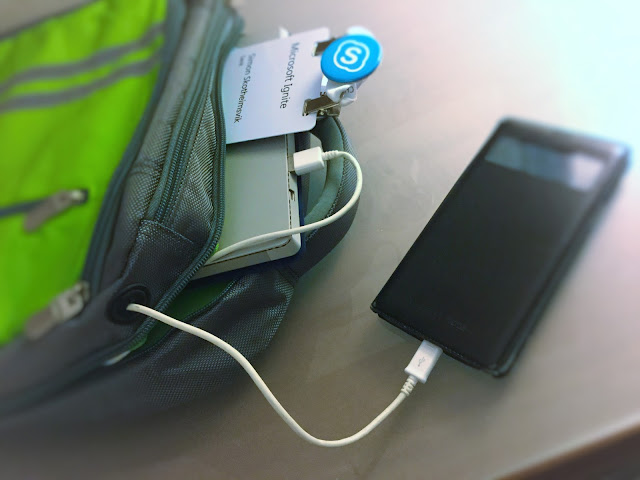
Charge cable through headphone port of the Microsoft bag made the surface a giant UPS for my phone.

No giveaways today - only pure knowledge!
And by the way - I did remember lunch today, but it was to late - they were empty...

Now it's time to catchup with the mailbox with my dual-monitor-hotel-room-system based on Surface, iPad and duet display!


Tuesday, September 27, 2016

MSIgnite 2016, Day1

The first official day at Microsoft Ignite 2016 in Atlanta, Georgia is over. It's been 14 hours since I left the hotel room. It's time to charge the batteries and put down some notes from the day.

Because of the time zone travel I was early awake and got the first shuttle bus from the hotel to the conference center. Kind of heavy traffic on the highway in to Atlanta.

5 lines of queue
With the early arrival, there were no queue at the breakfast in the C-building and we got a marvelous welcome from the Microsoft personell. Lucky me!

Breakfast done and I found my fastest way to the Phillips Arena by walking outside the buildings in the great weather.
Nice weather in Atlanta
With no queue at the Phillips Arena, the security check went fast, and I found a perfect seating in the middle of the huge stage.

The Keynote was a great experience with a lot of inspirational information from leading personells at Microsoft like Julia White, Scott Guthrie, Satya Nadella and many more.
BMW was one of many companies presented as heavy users of Microsoft Cloud technologies
New Office 365 applications and hardware was demonstrated
https://www.stormboard.com/ on surface hub
Techy people like me are also interested in the behind-the-scenes views from the stage production
Microsoft Ignite 2016 has 1417 sessions to chose from, and I had picked the Cloud Voice session with Gurdeep Singh Pall as my second session on this first day. I did however not expect the jam in the hallways when moving from the Phillips Arena to building B. 23.000 participants where on the move. Not all did know where to move, and a lot of people where restricted from moving because of security. Luckily I did find a good spot to join the "Move all your communications to Skype for Business" session.

We had a lot of good information and news during this session related to Skype for Business client for Mac, thight iOS callkit integration, Microsoft Meeting Room system, Logitech Smart Dock for Skype Room Systems, Crestron Skype Room Systems, Polycom RealConnect for Skype for Business, Cloud PBX news with exciting powershell demos, Analytics Dashboard, Skype Operations Framwork (SOF) and more.

The new Skype for Business innovations are described here.


Delanda Coleman demonstrating new Skype for Business client for Mac and iPhone

Ilya Bukshteyn and Gurdeep Singh demonstrating the new meeting capabilities with a lot of exciting news.
A really good session was over and it was time to find the next stage from my carefully picked schedule. I started to realize that my schedule was to tight - the hallways was to long and crowdy - the floor maps were to poor - the escalators regulations was annoying and my mobile phone battery was empty. I did however have good shoes.

After som back and forwards between the buildings and levels I learned that the Theatre sessions was hard to find. I did however got my self to the "Meet Windows Server 2016 and System Center 2016" session hold by Mike Neil and other impact full speakers. Here they actually announced the release of Microsoft Windows Server 2016 and explained many of the new features!
Just enough and just-in time administration
A lot of demos with PowerShell during the Windows Server 2016 session
I gave a visit to the Exhibit Hall before the next planned session. A lot of exciting stuff to see in this large area, a lot of giveaways to collect and actually some places to charge my phone.
Logitech Equipment for the Skype for Business Room experience
Logitech equipment for Skype for Business Room experience
Read more about Logitech SmartDock
The MVP Hub Talk session had a lot of great sessions - this was related to PowerShell
Ståle Hansen Talking about Skype for Business

Kanwal Khipple had a great session related to the many modules in Office365
At the end of the day I was entering the Skype for Business area of the giant Microsoft Showcase in the Exhibit hall. It turned out that a part of the Skype for Business design team was actually hanging out there discussing their system with the Ignite attendees - the same persons that was on stage together with Gurdeep earlier today. Interesting to hear their workflow and plans for Skype for Business and especially the unofficial information related to support for third party applications like call centers and switchboards in the cloud based Skype for Business. I did also meet a couple of Skype for Business friends from Norway and Sweden at this spot.

Ilya Bukshteyn was walking through the new Skype for Business Room system.
Surface4 and Windows10 as foundation. Windows Store delivers updates to the SfB Room System App.
Time to find the shuttle buss for the hotel. Traffic jam also this time because of a concert in town by Beyonce.

One truck for the Beyonce "The Formation World Tour" spotted yesterday...
Finally at the hotel room it's time to empty the bag, charge some batteries, summarize the day and revise the plans for tomorrow (I need to make space for a session by Ilya which he made me aware of).

Who mentioned food? Must have forgotten that today...


Wednesday, August 31, 2016

Interaction Studio starter ikke etter Cryptolocker angrep

Ved en Trio installasjon var det plutselig problemer med å starte Interaction Studio. Det stoppet på meldingen "could not load the template file".

For å få mer bakgrunnsinformasjon sjekker filen c:\Users\<username>\AppData\Roaming\InteractionStudio. Der finnes det mer informasjon rundt hvilken fil man ikke får tilgang til ved oppstart av Interaction Studio:
Trykk for større bilde
Finner mappestrukturen bak via Internet Information Server Manager og ser der at innholdet i mappen er kryptert av CryptoLocker virus:


I dette tilfellet var løsningen å dekryptere filene ettersom kunden hadde verktøy for dette fra et angrep som var for kort tid tilbake. Alternativt hadde det vært nødvendig å legge filene tilbake fra Backup. Man kan finne eventuelle andre filer som kan ha vært kryptert ved å søke gjennom serveren etter "*HELP_instructions.html".

Selve angrepet med påfølgende overskriving må ha skjedd på en PC med Trio klienten installert og med tilhørende tilgang til delte områder på Trio serveren. Det medførte ingen nedetid på Trio systemet sett bort fra manglende tilgang til Interaction Studio.